
 Pусский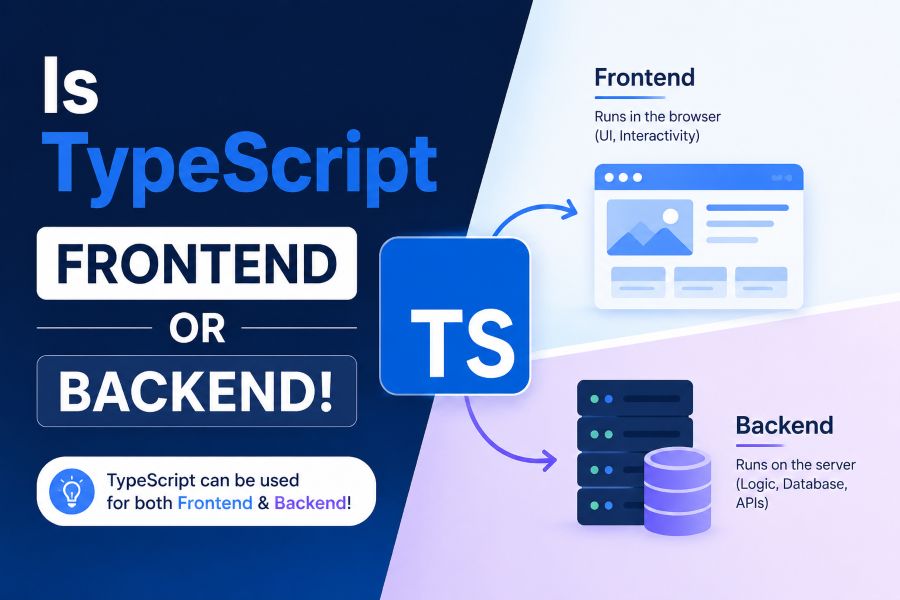
Is TypeScript frontend or backend? This is a common question for new developers because TypeScript appears in React apps, Angular projects, Node.js APIs, full-stack frameworks, and even enterprise software systems. The short answer is that TypeScript can be used for both frontend and backend development because it is a typed superset of JavaScript. It does not replace JavaScript. Instead, it adds static typing and better tooling before your code compiles into JavaScript.
If you are learning web development, this distinction matters. You may see .ts files in backend projects, .tsx files in React components, and shared type files in full-stack apps. That can make TypeScript feel confusing at first. This guide explains where TypeScript fits, how it works on both sides of development, and when it is worth learning or using.
Is TypeScript Frontend or Backend?
TypeScript is both frontend and backend. It is a typed version of JavaScript, so it can be used in browser-based frontend apps and server-side backend apps with Node.js. Developers use TypeScript with React, Angular, Vue, Express, NestJS, and full-stack frameworks because it helps catch errors earlier, improves code structure, and makes large projects easier to maintain.
What TypeScript Really Is and Why It Confuses Beginners
TypeScript is a programming language built on top of JavaScript. It adds static typing, interfaces, type annotations, better editor support, and stronger error checking during development.
The confusion starts because TypeScript is not tied to one part of web development. Some languages are strongly associated with the backend, while HTML and CSS are clearly frontend technologies. TypeScript is different because it follows JavaScript. Wherever JavaScript can be used, TypeScript can usually be used too.
That means TypeScript can appear in a frontend React component, a backend API route, a Next.js app, a NestJS server, or a shared types folder used by both client and server code.
The important thing to understand is this: TypeScript improves the developer experience before the final code runs. Browsers and Node.js usually execute JavaScript, not raw TypeScript. The TypeScript compiler checks your code and converts it into JavaScript.
This is why TypeScript is not strictly frontend or backend. It is a development language for writing safer JavaScript across different environments.
If you are building a modern website or web app, TypeScript can support cleaner structure, better collaboration, and fewer simple mistakes. For business websites or custom apps, web development services can use TypeScript when the project needs stronger long-term maintainability.
How TypeScript Works in Frontend Development
Frontend development focuses on what users see and interact with in the browser. This includes layouts, buttons, forms, dashboards, navigation, animations, and client-side logic.
TypeScript frontend development is common in frameworks such as React, Angular, Vue, Next.js, and Vite-powered apps. Angular uses TypeScript by default, while React and Vue support TypeScript strongly in modern workflows.
In frontend projects, TypeScript helps define what data a component expects. For example, a product card component may need a title, price, image, and rating. TypeScript lets you define those fields so the editor warns you if something is missing or incorrect.
This is useful because frontend apps often handle many moving parts. User profiles, shopping carts, forms, filters, dashboards, search results, and API responses can become hard to manage in plain JavaScript.
TypeScript helps frontend developers with:
- Component props
- State types
- Form values
- API response shapes
- Event handling
- Reusable UI components
- Route parameters
- Error prevention
- Autocomplete in VS Code
A practical example is a React form. Without TypeScript, you may not notice that a field can be undefined until the form breaks. With TypeScript, your editor can warn you before the bug reaches the browser.
TypeScript frontend work is especially helpful for larger user interfaces, SaaS dashboards, e-commerce stores, admin panels, and apps where many components share the same data.
How TypeScript Works in Backend Development
Backend development focuses on the server side of an application. This includes APIs, databases, authentication, business logic, file processing, payment handling, and communication between systems.
TypeScript backend development is usually built on Node.js. Popular backend tools include Express.js, NestJS, Fastify, Prisma, TypeORM, and server-side parts of frameworks like Next.js.
On the backend, TypeScript helps define request data, response data, database models, service methods, and API contracts. This is valuable because backend errors can affect security, data accuracy, and user experience.
For example, an API endpoint may expect a user ID as a string and a status as a specific value. TypeScript helps you define those expectations clearly. If another developer passes the wrong data, the code editor or compiler can catch the problem earlier.
Backend TypeScript is useful for:
- API request and response types
- Database models
- Authentication logic
- Service classes
- Error handling
- Middleware
- Environment variables
- Shared business rules
- Backend validation workflows
NestJS is a strong example of backend TypeScript. It is built around TypeScript features and uses decorators, services, modules, and controllers to structure large backend applications.
Express can also use TypeScript, although it needs more setup. Developers often add types for request bodies, route parameters, and responses to make APIs easier to maintain.
TypeScript is not required for backend development, but it becomes more valuable as the backend grows. The more data flows through your application, the more useful static typing becomes.
Is TypeScript Frontend or Backend in Full-Stack Development?
In full-stack development, TypeScript can be used on both sides of the application. This is one of its strongest advantages.
A full-stack TypeScript project may use React or Next.js on the frontend and Node.js, Express, or NestJS on the backend. Both sides can share the same types, which reduces mismatch between what the frontend expects and what the backend sends.
For example, imagine a backend API returns a user profile with this structure:
- user ID
- name
- role
- account status
If the frontend and backend share the same TypeScript type, both sides understand the expected shape of the data. If the backend changes accountStatus to status, TypeScript can help reveal where the frontend also needs an update.
This is powerful because many bugs happen at the boundary between frontend and backend. The frontend expects one format, while the backend sends another. TypeScript helps make those contracts more visible.
Full-stack TypeScript is common in:
- SaaS platforms
- Dashboards
- E-commerce systems
- Internal business tools
- Booking platforms
- API-driven websites
- Admin panels
- Startup MVPs
- Enterprise applications
A good full-stack workflow may look like this:
- Define shared types for users, products, orders, or API responses.
- Use those types in backend controllers or services.
- Reuse those types in frontend components.
- Validate real incoming data at runtime.
- Update shared types when the data model changes.
This workflow helps teams build faster with fewer misunderstandings.
TypeScript vs JavaScript: What Is the Real Difference?
JavaScript is the language that runs in browsers and Node.js. TypeScript is a superset of JavaScript that adds static typing and development-time checks.
That means valid JavaScript can often become valid TypeScript, but TypeScript adds extra rules and features. These rules help you catch mistakes before the code runs.
The main difference is timing. JavaScript often reveals many mistakes at runtime. TypeScript tries to catch many of those mistakes while you are writing or compiling the code.
Here is a simple comparison:
- JavaScript is easier to start with.
- TypeScript adds structure and type safety.
- JavaScript runs directly in browsers.
- TypeScript usually compiles to JavaScript.
- JavaScript is flexible.
- TypeScript is better for larger, long-term projects.
- JavaScript may be faster for small scripts.
- TypeScript can reduce bugs in complex codebases.
The formula is:
TypeScript Value = JavaScript Compatibility + Static Typing + Better Tooling + Shared Code Contracts + Fewer Runtime Errors
This formula helps explain why TypeScript is popular. It does not remove JavaScript. It makes JavaScript projects easier to understand, refactor, and scale.
For beginners, the best path is usually to learn JavaScript fundamentals first. Once you understand variables, functions, arrays, objects, DOM basics, async code, and modules, TypeScript becomes much easier to understand.
The FBS TypeScript Framework: Frontend, Backend, Shared Types
The FBS TypeScript Framework is a simple way to decide where TypeScript fits in a project. FBS stands for Frontend, Backend, and Shared Types.
Frontend
Use TypeScript on the frontend when your interface has many components, forms, states, or API responses. It helps prevent UI bugs and makes components easier to reuse.
A React or Vue project with many props and data states can quickly become hard to manage without type support. TypeScript makes those relationships clearer.
Backend
Use TypeScript on the backend when your API, database, authentication, or business logic needs structure. It helps you define what data your server expects and returns.
For example, an Express or NestJS API can use TypeScript to type request bodies, route parameters, service functions, and database records.
Shared Types
Use shared types when the frontend and backend need to agree on data structures. This is where TypeScript becomes especially useful in full-stack development.
Shared types reduce duplicate work. They also help prevent the classic problem where the backend changes a response but the frontend still expects the old shape.
This framework gives you a simple decision rule. If your project has complex UI, complex server logic, or shared data between both sides, TypeScript can add real value.
Common TypeScript Tools and Platforms
TypeScript works with a modern development toolchain. You do not need to master everything at once, but knowing the main tools helps you understand how TypeScript projects are built.
The TypeScript compiler checks .ts and .tsx files and converts them into JavaScript. The tsconfig file controls how strict TypeScript should be, what files it should include, and what JavaScript version it should output.
VS Code is widely used with TypeScript because it provides strong autocomplete, inline errors, jump-to-definition, and refactoring support. This is one reason developers often describe TypeScript as improving the development experience.
Frontend projects may use Vite, Next.js, React, Angular, or Vue. Backend projects may use Node.js, Express, NestJS, Prisma, or Fastify.
Useful tools include:
- TypeScript compiler
- tsconfig
- Node.js
- npm
- VS Code
- Vite
- React
- Angular
- Vue.js
- Express.js
- NestJS
- Next.js
- ESLint
- Prettier
ESLint helps catch code quality issues, while Prettier keeps formatting consistent. These tools work well with TypeScript in team projects.
A useful benchmark to know is that TypeScript has remained one of the most widely adopted tools in modern JavaScript development, especially among teams building large frontend and full-stack apps. Its popularity comes from practical benefits, not hype alone.
When Should You Use TypeScript?
You should use TypeScript when your project needs structure, reliability, and long-term maintainability. It becomes more valuable as the codebase grows or more developers work on it.
TypeScript is a good choice for:
- React dashboards
- Angular applications
- Vue apps with complex state
- Node.js APIs
- Express backends
- NestJS services
- Full-stack apps
- SaaS platforms
- E-commerce systems
- Large team projects
- Apps with shared frontend and backend data
You may not need TypeScript for every small project. If you are writing a tiny script, a simple landing page, or a quick prototype, plain JavaScript may be faster.
TypeScript also has a learning curve. Beginners may feel slowed down at first because they must learn types, interfaces, generics, compiler errors, and project setup.
That said, the learning curve can pay off. TypeScript helps you understand your code more clearly and catch problems earlier.
A practical rule is simple: use JavaScript when speed and simplicity matter most. Use TypeScript when reliability, teamwork, and long-term structure matter more.
Common Misconceptions About TypeScript
Many beginners misunderstand TypeScript because it appears in different parts of the development stack.
One common myth is that TypeScript is only for frontend development. This is not true. TypeScript is popular in frontend apps, but it is also widely used in backend Node.js projects.
Another myth is that TypeScript replaces JavaScript. It does not. TypeScript builds on JavaScript and compiles into JavaScript.
Some beginners also think TypeScript runs directly in browsers. In most projects, the browser runs compiled JavaScript. TypeScript is used during development to catch errors and improve tooling.
Another misconception is that TypeScript prevents all bugs. It does not. TypeScript can catch many type-related mistakes, but it cannot fully replace testing, validation, security checks, or good architecture.
It is also wrong to think TypeScript is only for large companies. Small teams can benefit from TypeScript too, especially if they are building apps that will grow over time.
The best way to understand TypeScript is to see it as a safety layer for JavaScript development. It makes code clearer, not magic.
Conclusion
TypeScript can be used for frontend, backend, and full-stack development because it follows JavaScript wherever JavaScript is used. In frontend projects, it helps with components, props, state, forms, and API responses. In backend projects, it helps with routes, requests, services, database models, and server logic. In full-stack projects, it becomes even more useful because shared types can connect the frontend and backend more safely.
If you are a beginner, learn the basics of JavaScript first, then move into TypeScript when you start building larger applications. If you already work with React, Angular, Vue, Node.js, Express, NestJS, or Next.js, TypeScript can make your projects easier to maintain.
The key takeaway is simple: TypeScript is not frontend or backend only. It is a typed development layer for building better JavaScript applications across both sides of the web.
FAQs
Is TypeScript Mainly Frontend or Backend?
TypeScript is not mainly frontend or backend. It can be used in both areas because it is based on JavaScript. Many developers use it in frontend frameworks like React and Angular, and backend environments like Node.js, Express, and NestJS.
Does TypeScript Run in the Browser?
Browsers usually run JavaScript, not raw TypeScript. TypeScript is normally compiled into JavaScript before it runs in the browser. This lets developers write safer code while still producing browser-compatible JavaScript output.
Can I Use TypeScript With Node.js?
Yes, TypeScript works well with Node.js. Developers use it to build APIs, backend services, authentication systems, database workflows, and server-side applications. It is especially common with Express.js, NestJS, and full-stack JavaScript projects.
Should I Learn JavaScript Before TypeScript?
Yes, most beginners should learn JavaScript first. TypeScript builds on JavaScript, so it is easier to understand once you know variables, functions, objects, arrays, modules, async code, and basic web development concepts.
Is TypeScript Better Than JavaScript?
TypeScript is better for larger, structured, long-term projects because it adds type safety and better tooling. JavaScript can still be better for small scripts, quick experiments, simple websites, or beginners learning programming basics.
Is TypeScript Useful for Full-Stack Development?
Yes, TypeScript is very useful for full-stack development. It lets frontend and backend code share types, which helps reduce data mismatches between APIs and user interfaces. This is helpful in SaaS apps, dashboards, e-commerce systems, and large web platforms.





